Cara Instalasi dan Registrasi GitLab Runner di Ubuntu Server
AH
Ahmad Lukman Hakim
Dedicated Author of LUKMANLAB
publishedSabtu, 16 November 2024
updatedMinggu, 19 Juli 2026
# gitlab# linux
Instalasi
Disini saya menggunakan arsitektur
amd64. Silahkan sesuaikan dengan mesin anda.
Tips: sebelum eksekusi proses download dengan
curlsaya sarankan menggunakanscreenagar ketika koneksi ssh terputus, proses download masih berjalan.
curl -LJO "https://s3.dualstack.us-east-1.amazonaws.com/gitlab-runner-downloads/latest/deb/gitlab-runner_amd64.deb"
sudo dpkg -i gitlab-runner_amd64.deb
Registrasi
- Generate runner token melalui GitLab UI, kemudian export variable seperti berikut:
export RUNNER_TOKEN=iZRRGZsjXpbrdJirZxX-
- Registrasi mesin runner dengan GitLab Server (non-interactive)
sudo gitlab-runner register \
  --non-interactive \
  --url "https://gitlab.mydomain.com/" \
  --registration-token "$RUNNER_TOKEN" \
  --executor "ssh" \
  --tag-list "staging-new" \
  --description "staging mydomain" \
  --ssh-user "userserver" \
  --ssh-password "somePassword" \
  --ssh-host "localhost" \
  --ssh-disable-strict-host-key-checking "true"
- Pastikan file config sesuai setelah perintah diatas dijalankan:
concurrent = 5
check_interval = 0
shutdown_timeout = 0

[session_server]
  session_timeout = 1800

[[runners]]
  name = "staging lukmanlab"
  url = "https://gitlab.lukmanlab.com/"
  id = 2
  token = "t1_61wARcSb7cz8yZYBy"
  token_obtained_at = 2024-11-14T01:25:02Z
  token_expires_at = 0001-01-01T00:00:00Z
  executor = "ssh"
  [runners.custom_build_dir]
  [runners.cache]
    MaxUploadedArchiveSize = 0
    [runners.cache.s3]
    [runners.cache.gcs]
    [runners.cache.azure]
  [runners.ssh]
    user = "userserver"
    host = "localhost"
    password = "somePassword"
    disable_strict_host_key_checking = true
Biasanya saya ganti nilai
concurrentmenjadi lebih dari 1.
- Jalankan gitlab runner:
gitlab-runner start
- Cek status service
gitlab-runner status
Runtime platform                                    arch=amd64 os=linux pid=1607086 revision=c6eae8d7 version=17.5.2
gitlab-runner: Service is running
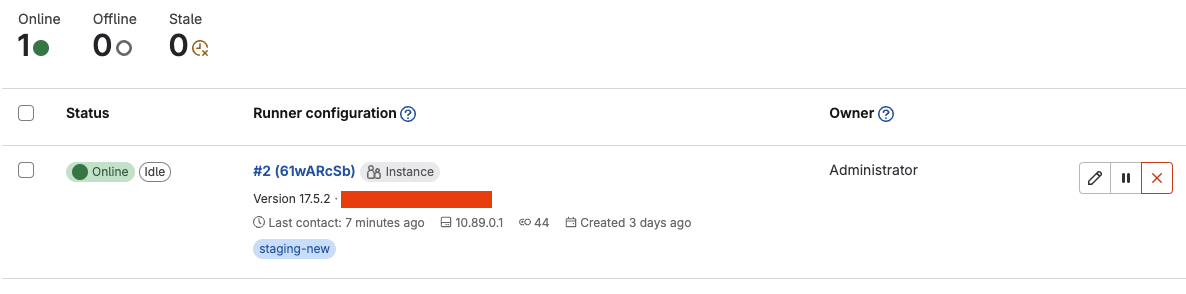
- Slahkan cek runner di GitLab UI. Pastikan terdeteksi online.